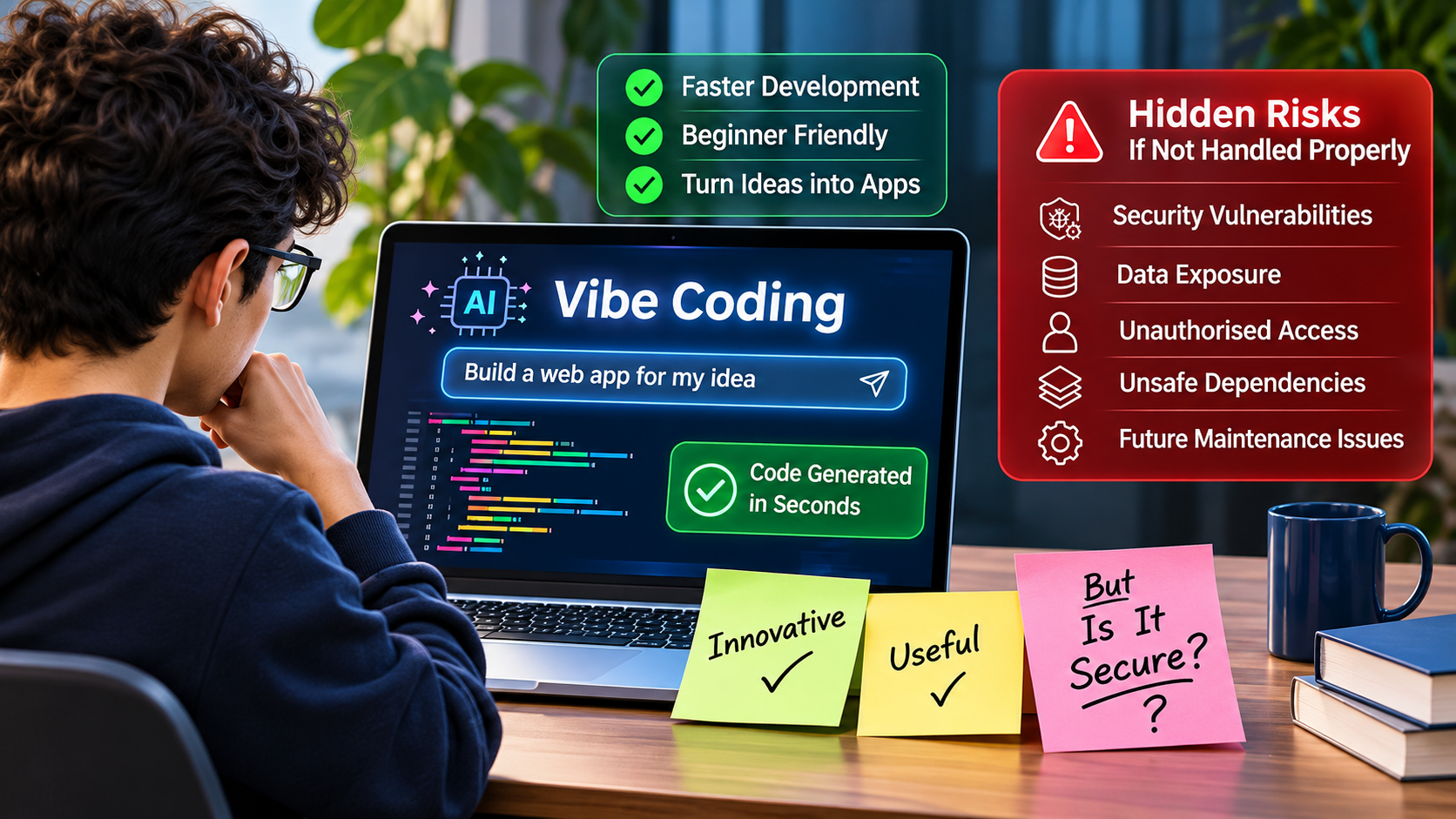
Imagine this. It’s a quiet Sunday afternoon in Hamilton. A café owner who has never written a line of code opens an AI tool and types: “Build me an online booking system with customer logins and a payment page.”
By dinner, it’s live. Customers can book tables, create accounts and pay. Everything works.
But here’s the question few people ask: working for whom? Because a stranger with a little curiosity might be able to see every customer’s booking, email address and phone number, without ever logging in.
This is the quiet trade-off behind one of the biggest tech trends of the last two years. And it’s why vibe coding security deserves attention from every business owner, founder and developer building with AI.
What Is Vibe Coding?
Vibe coding means building software by describing what you want in plain language and letting AI write the code. The term was coined by AI researcher Andrej Karpathy in February 2025. He described a style of working where you stop reading the code closely, accept what the AI suggests, and simply paste error messages back in until things work (OpenSSF Glossary).
Today, tools such as ChatGPT, GitHub Copilot, Claude and Cursor make this possible for almost anyone. You type a request like “add a contact form that emails me new enquiries”, and the tool produces the code, explains it and often fixes its own mistakes.
Why it’s so popular
The appeal is easy to understand:
- Speed. an idea can become a working prototype in hours, not weeks.
- Lower cost. startups can test ideas before hiring a development team.
- Accessibility. beginners can build basic websites, dashboards and tools without years of training.
- Productivity. experienced developers hand repetitive work to AI and focus on harder problems.
None of this is a bad thing. AI-assisted development is a genuine leap forward. The problem starts when fast gets mistaken for finished.
The Hidden Problem: “It Works” Is Not the Same as “It’s Safe”
A working app does what you expect when you use it. A secure, production-ready app also behaves correctly when someone tries to misuse it, when a thousand people use it at once, and when something breaks at 2am.
AI tools are very good at the first part. They are much less consistent at the second. Veracode’s 2025 GenAI Code Security Report tested more than 100 large language models on 80 coding tasks. When the models could choose between a secure and an insecure way to write the code, they chose the insecure option 45% of the time. Newer models wrote cleaner code, but their security performance did not improve.
The reason is simple. An AI tool builds what you ask for. If your prompt says “add a login page” and says nothing about rate limiting, password storage or who can see what data, the AI often won’t add those protections. Security becomes something nobody asked for, so nobody gets it.
The Vulnerabilities Hiding Behind a Working App
Let’s go back to our café booking system. Here is what could be lurking underneath, in everyday terms.
Broken access control: the “change one number” problem
A customer views their booking at a web address ending in /booking/1042. Out of curiosity, they change it to /booking/1041, and see someone else’s name, phone number and dinner plans. The app checked that they were logged in, but never checked whether that booking was theirs.
This is called broken access control, and it sits at number one on the OWASP Top 10:2025, the most widely used list of critical web application risks. OWASP found some form of it in every application tested.
It has already affected AI-built apps in the real world. In 2025, researchers found that more than 170 apps built with the AI app builder Lovable had database settings that let unauthenticated visitors read or change data, tracked as CVE-2025-48757 (Superblocks).
Weak authentication and exposed API keys
AI-generated login systems may skip basics such as limiting failed login attempts, enforcing strong passwords or securely hashing them. Similarly, when you ask an AI to “connect to my payment provider”, it may paste the secret API key directly into the code. If that code runs in the browser or ends up in a public GitHub repository, anyone can copy the key and use your account. OWASP’s Secrets Management Cheat Sheet warns that hardcoded credentials in source code are a common way organisations leak access.
SQL injection and cross-site scripting (XSS)
Both happen when an app trusts what users type.
- SQL injection: someone types database commands into your search box instead of a name, and your app runs them, potentially revealing or deleting your customer records.
- XSS: someone posts a “review” containing hidden code. Every visitor who reads it runs that code in their browser, which can steal their session or redirect them to a fake page. Veracode found AI models failed to defend against XSS in 86% of relevant samples.
Insecure APIs and sensitive data exposure
Modern apps talk to their servers through APIs. AI-generated APIs often return far more data than the screen shows, such as full customer records when only a first name is needed. The page looks fine, but anyone inspecting the traffic sees everything.
Unsafe third-party dependencies
AI tools frequently suggest software packages to install. Sometimes those packages don’t exist. A study of 16 code-generating models found that 19.7% of recommended packages were hallucinated. Attackers can register those fake names and fill them with malware, a tactic now called “slopsquatting” (CSO Online).
Poor code quality and no security testing
Vibe-coded projects can grow into tangled, duplicated code that no one fully understands. Without tests, every new prompt risks breaking something that used to work, and nobody notices until a customer does.
What Happens If These Issues Are Ignored?
Most of these flaws stay invisible until someone finds them. When they do, the cost rarely stops at a quick fix.
- Data breaches: exposed customer details can lead to identity theft and scams. Under New Zealand’s Privacy Act 2020, a breach likely to cause serious harm must be reported to the Privacy Commissioner and the affected people.
- Unauthorised access: attackers who get into an admin panel or a leaked API key can change prices, issue refunds or run up large bills on your cloud and AI accounts.
- Financial losses: New Zealand’s NCSC recorded $26.9 million in direct financial losses reported in 2024/25, up from $21.6 million the year before (NCSC NZ Cyber Threat Report 2025). Recovery costs, downtime and legal advice come on top.
- Application failures: code that was never tested under real conditions can crash during your busiest week.
- Maintenance headaches: when no one understands how the app works, every change becomes slow, risky and expensive. Some businesses end up rebuilding from scratch.
- Loss of customer trust: this is the hardest to recover. A customer who hears their data leaked from your booking page may never book again.
For a small business, one incident can outweigh every hour and dollar the AI saved.
How to Use Vibe Coding Safely
The goal isn’t to stop using AI. It’s to stop trusting it blindly. Even the toolmakers say so: GitHub’s own Copilot documentation tells users to review every suggestion before accepting it and to test it for errors and security concerns.
The UK’s National Cyber Security Centre puts it neatly: “The risk isn’t in using AI.” The risk is skipping safeguards when the stakes are high (UKAuthority). A throwaway prototype can be vibe coded freely. A login system or anything holding customer data needs much closer care.
Practical vibe coding security habits
- Treat AI code like a junior developer’s first draft. Read it, ask the AI to explain anything unclear, and never ship what nobody understands.
- Put security in your prompts. Ask for input validation, parameterised database queries, password hashing and access checks on every request.
- Get a human code review. Have an experienced developer review anything that handles logins, payments or personal data before it goes live.
- Validate every input. Check and clean everything users type, on the server, not just in the browser.
- Protect your credentials. Keep API keys and passwords in environment variables or a secrets manager, never in the code. Rotate any key that has been exposed.
- Verify dependencies. Confirm every package exists, is actively maintained and is the one you meant to install. Use automated dependency scanning.
- Test before you launch. Combine automated security scanning with manual testing, such as trying to view another user’s data.
- Keep it updated. Patch frameworks, plugins and server software regularly. Our guide to PHP security updates in 2026 shows why outdated software becomes an easy target.
- Plan for maintenance. Reliable hosting and ongoing support keeps backups, monitoring and fixes in place long after launch.
Conclusion: AI Can Write the Code. You Still Own the Risk.
Remember our café owner? Their idea was good, and AI helped them build it in an afternoon. What it couldn’t do was guarantee that the app would protect their customers, survive a busy Friday night or stay easy to update next year.
That is the real lesson of vibe coding security. Anyone can generate an application with AI. Building software that is secure, reliable and maintainable still takes technical knowledge, proper testing and human oversight.
At Waiktech, we use AI to work faster, but every website and app we deliver is reviewed, tested and supported by real developers. If you’ve built a prototype with AI and want to know whether it’s ready for real customers, or you’re planning something new, our web development and custom web application teams in Hamilton can help.
Talk to Waiktech about your project.
How Waiktech Can Help You
Vibe coding is a great way to build. With a few well-written prompts, you can turn an idea into a working website or application faster and more easily than ever before. For many businesses and founders, it’s the quickest way to get something real in front of customers.
But once your project is live, some important questions can come up. Is the code actually secure? Is everything working the way it should behind the scenes? Could there be hidden vulnerabilities that nobody has spotted yet? As Mia found out, an app can look perfect on the surface while quietly exposing data underneath.
That’s where Waiktech can help.
A second pair of expert eyes on your vibe-coded project
Our developers in Hamilton can take a close look at what you’ve built and help you understand where it stands:
- Project review: we go through your website or app, including logins, user permissions, customer data, API keys and third-party packages.
- Security checks: we look for common weaknesses, such as those in the OWASP Top 10, and other hidden issues AI tools often miss.
- Functionality and code quality: we check that features work reliably and that the code is clear enough to maintain and grow.
- Practical recommendations: you get clear, plain-English suggestions on what to fix first, what can wait and how to make your app stronger.
If you’d like help putting those improvements in place, our custom web application and web development teams can work alongside you. We’re not here to undo what you’ve built, just to help make it secure and reliable.
Built something with vibe coding? We’d love to see it. Get in touch with Waiktech, share your project and tell us what’s on your mind. Whether it’s a security worry, a bug that keeps coming back or just a feeling that something isn’t quite right, our team is happy to talk it through.
Frequently Asked Questions
Is vibe coding safe for business use?
It can be, depending on what you build and how you check it. Vibe coding is fine for prototypes and internal experiments. Anything that handles customer data, logins or payments needs human review and security testing before launch.
What are the biggest security risks of AI-generated code?
The most common are broken access control, weak authentication, exposed API keys, injection flaws such as SQL injection and XSS, insecure APIs and unsafe or fake third-party packages.
Can I launch an app I built with ChatGPT, Copilot or Cursor?
Yes, but treat the AI’s output as a draft. Have it reviewed by an experienced developer, run security tests, store credentials safely and plan for ongoing updates.
How do I check whether my AI-built app is secure?
Start with a code review focused on logins, data access and credentials. Then run automated vulnerability and dependency scans, and test whether one user can see or change another user’s data.
References
- OpenSSF Glossary: Vibe coding
- Veracode: 2025 GenAI Code Security Report press release
- OWASP Top 10:2025
- OWASP A01:2025 Broken Access Control
- OWASP Secrets Management Cheat Sheet
- Superblocks: Lovable vulnerability (CVE-2025-48757) explained
- CSO Online: AI hallucinations lead to a new cyber threat, slopsquatting
- GitHub Docs: Responsible use of Copilot code completion
- UK NCSC blog: Vibe check, AI may replace SaaS (but not for a while)
- UKAuthority: NCSC launches vibe coding spectrum approach
- NCSC New Zealand: Cyber Threat Report 2025, incident reporting analysis
Internal links used (all verified live): Web Development · Custom Web Applications · Hosting & Support · PHP Security Updates 2026 · Contact Us